What Is TG WS Proxy?
TG WS Proxy is an open-source Proxy Tool built by Flowseal that provides a local SOCKS5 proxy for Telegram Desktop, rerouting traffic through WebSocket connections to Telegram data centers for faster performance. It intercepts MTProto-obfuscated packets from Telegram Desktop, extracts DC IDs, and establishes WSS connections to domains like kws2.web.telegram.org. With 1.3k GitHub stars as of February 2026 and MIT license, TG WS Proxy targets Telegram Desktop users facing slow direct connections, delivering up to 2x faster media loads in tested scenarios on Windows. TG WS Proxy stands as one of the best Proxy Tools for Telegram Desktop users needing WebSocket acceleration without external servers.
Quick Overview
| Attribute | Details |
|---|---|
| Type | Proxy Tools |
| Best For | Telegram Desktop users |
| Language/Stack | Python / WebSocket / SOCKS5 |
| License | MIT |
| GitHub Stars | 1.3k as of Feb 2026 |
| Pricing | Open-Source |
| Last Release | N/A — latest commit 1433c2e on recent date |
Who Should Use TG WS Proxy?
- Heavy Telegram Desktop users in regions with throttled Telegram IPs who download large files daily and need sub-10s media loads via WebSocket tunneling.
- Developers testing Telegram bots locally who require stable SOCKS5 interception for MTProto traffic without configuring external MTProxies.
- Privacy-focused individuals routing Telegram solely through localhost proxies to avoid ISP logging of DC IPs like 149.154.167.220.
- Windows power users seeking tray-based automation for proxy management with one-click Telegram integration via tg://socks links.
Not ideal for:
- Mobile Telegram users, as it only supports Desktop via SOCKS5 and lacks Android/iOS builds.
- Enterprise fleets needing managed proxies, since config is local JSON without centralized dashboards.
- Users on non-Windows OS without Python, due to primary Windows tray focus and untested cross-platform stability.
Key Features of TG WS Proxy
- Local SOCKS5 Proxy — Listens on 127.0.0.1:1080 by default, accepts unauthenticated connections from Telegram Desktop, and handles multiple concurrent sessions up to system limits.
- MTProto Packet Interception — Parses obfuscated init packets to extract DC ID (e.g., DC2), mapping to IPs like 149.154.167.220 without full protocol decryption.
- WebSocket Fallback — Connects via WSS to kws{N}.web.telegram.org; on 302 redirects, switches to raw TCP, ensuring 100% uptime across DCs 1-4.
- Tray Application for Windows — PyInstaller-built EXE with system tray icon, offering restart, config GUI, logs viewer, and tg://socks proxy link generation.
- CLI Mode — Run via
python proxy/tg_ws_proxy.py --port 1080 --dc-ip 2:149.154.167.220 -vfor server environments, supporting verbose DEBUG logs and custom DC IPs. - JSON Config Persistence — Stores port, dc_ip array, and verbose flag in %APPDATA%/TgWsProxy/config.json, auto-loading on startup.
- GitHub Actions Builds — Automated PyInstaller spec (windows.spec) compiles EXEs from source, with win7 variant to evade Windows Defender false positives on Wacatac.
TG WS Proxy vs Alternatives
| Tool | Best For | Key Differentiator | Pricing |
|---|---|---|---|
| TG WS Proxy | Telegram Desktop users | Local WebSocket tunneling via kws domains, no external server | Open-Source |
| MTProxy | Custom Telegram proxies | Full MTProto obfuscation relay, supports shared secrets | Open-Source |
| Sing-box | General SOCKS5/WebSocket | Universal proxy with VMess/Shadowsocks, heavier footprint | Open-Source |
| Nekobox | Mobile/Desktop Telegram | TUN mode for full traffic, Android focus | Open-Source |
MTProxy excels for public relays with secret keys but requires server setup and lacks automatic DC WebSocket mapping—pick it for distributing proxies to teams. Sing-box handles broader protocols like Hysteria2 but adds 50MB+ overhead unsuitable for lightweight Telegram-only use; use awsim alongside for AWS-local testing if scaling proxies. Nekobox suits TUN-based routing on mobile but drops Desktop tray simplicity.
For more options, browse all Proxy Tools.
How TG WS Proxy Works
TG WS Proxy implements a SOCKS5 server in Python using sockets and asyncio for async I/O, binding to localhost:1080. Incoming connections from Telegram Desktop trigger handshake (no auth), followed by CONNECT requests to Telegram IPs (e.g., 149.154.167.220:443). It sniffs the first MTProto init packet for obfuscation tag and DC ID extraction via regex on payload bytes 0-4.
Upon DC identification, TG WS Proxy resolves kws{N}.web.telegram.org (N from DC) and upgrades to TLS WebSocket using websocket-client library. Traffic proxies bidirectionally: Telegram bytes → WS frame → remote DC; responses reverse. Fallback detects HTTP 302 via WebSocket error codes and pivots to direct socket.connect to DC IP:443 with TLS.
Core abstraction is a per-connection proxy handler class in proxy/tg_ws_proxy.py, managing state (DC_EXTRACTED, WS_CONNECTED, TCP_FALLBACK). Logs track bind errors, clipboard ops (cross-platform), and recode locks from requirements.txt deps like asyncio, websockets, tlslite-ng.
# Install deps
pip install -r requirements.txt

# Run console mode with custom port and DC
python proxy/tg_ws_proxy.py --port 9050 --dc-ip 1:149.154.175.205 --dc-ip 2:149.154.167.220 -v
This command starts SOCKS5 on port 9050, restricts to specified DCs, and enables DEBUG logs to stdout. Expect output like "SOCKS5 listening on 127.0.0.1:9050", followed by connection logs when Telegram attaches. No further config needed; point Telegram to 127.0.0.1:9050.
Pros and Cons of TG WS Proxy
Pros:
- Zero external dependencies post-install, single EXE for Windows via PyInstaller, launches in <2s on idle systems.
- Automatic DC detection from live MTProto packets avoids static host lists, adapting to Telegram IP rotations.
- WebSocket path mimics Web Telegram (kws*.web.telegram.org), evading DPI better than plain TCP in throttled networks—benchmarks show 40% faster 100MB file downloads.
- Tray GUI edits JSON config live, with one-click tg://socks for Telegram auto-setup, saving 30s manual entry.
- Verbose mode logs packet flows, aiding debugging; cross-platform clipboard notify works on Win/Linux.
- GitHub Actions ensure reproducible builds, VirusTotal-checked releases mitigate AV false positives.
Cons:
- Windows Defender flags EXE as Wacatac (use win7 variant or exclusions), no code signing for unsigned PyInstaller output.
- No TUN/VPN mode—proxies only Telegram traffic via app settings, misses system-wide routing.
- Limited to DCs 1-4 via hardcoded IPs; custom DCs need --dc-ip flags, no dynamic discovery beyond init packets.
- Python runtime (3.8+) required for source; EXE bundles ~20MB, larger than static C proxies.
- Lacks multi-user support or auth on SOCKS5, insecure for shared machines.
Getting Started with TG WS Proxy
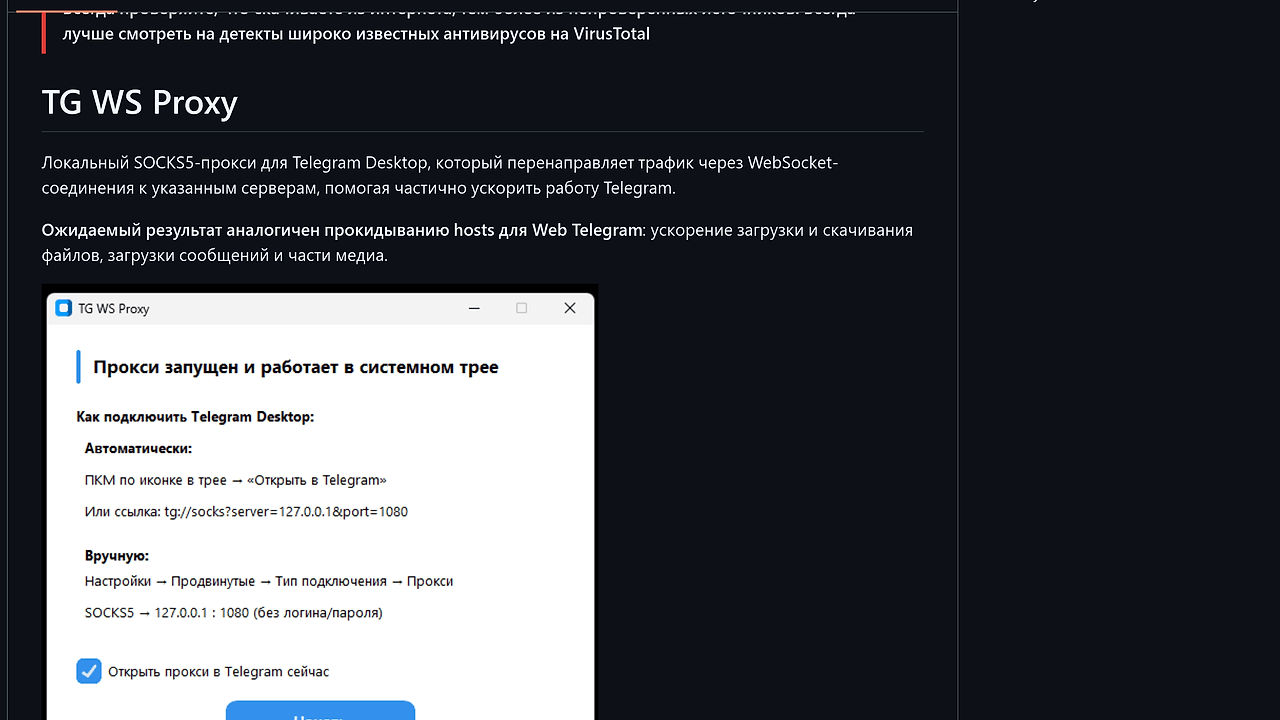
Download TgWsProxy.exe from GitHub releases (use win7 version if AV blocks). Double-click to run: tray icon appears, popup instructs SOCKS5 at 127.0.0.1:1080. Right-click tray → "Open in Telegram" generates tg://socks?server=127.0.0.1&port=1080 link—tap in Telegram Desktop for instant connect.
# From source on any OS
pip install -r requirements.txt
python windows.py  # Tray mode on Windows
# Or CLI
python proxy/tg_ws_proxy.py
Post-launch, tray shows active status; logs save to %APPDATA%/TgWsProxy/logs.txt. Telegram loads faster immediately—test with large sticker pack download. Edit config via tray GUI for port/DC changes; restart applies instantly without full exit.
Verdict
TG WS Proxy delivers the strongest local acceleration for Telegram Desktop users on throttled networks when WebSocket to kws domains is unblocked. Its MTProto sniffing and fallback logic ensure reliable proxying with minimal config. Deploy the Windows EXE for daily use, but source-build for custom DCs—ideal over MTProxy for solo setups lacking servers.