What Is supacrawl?
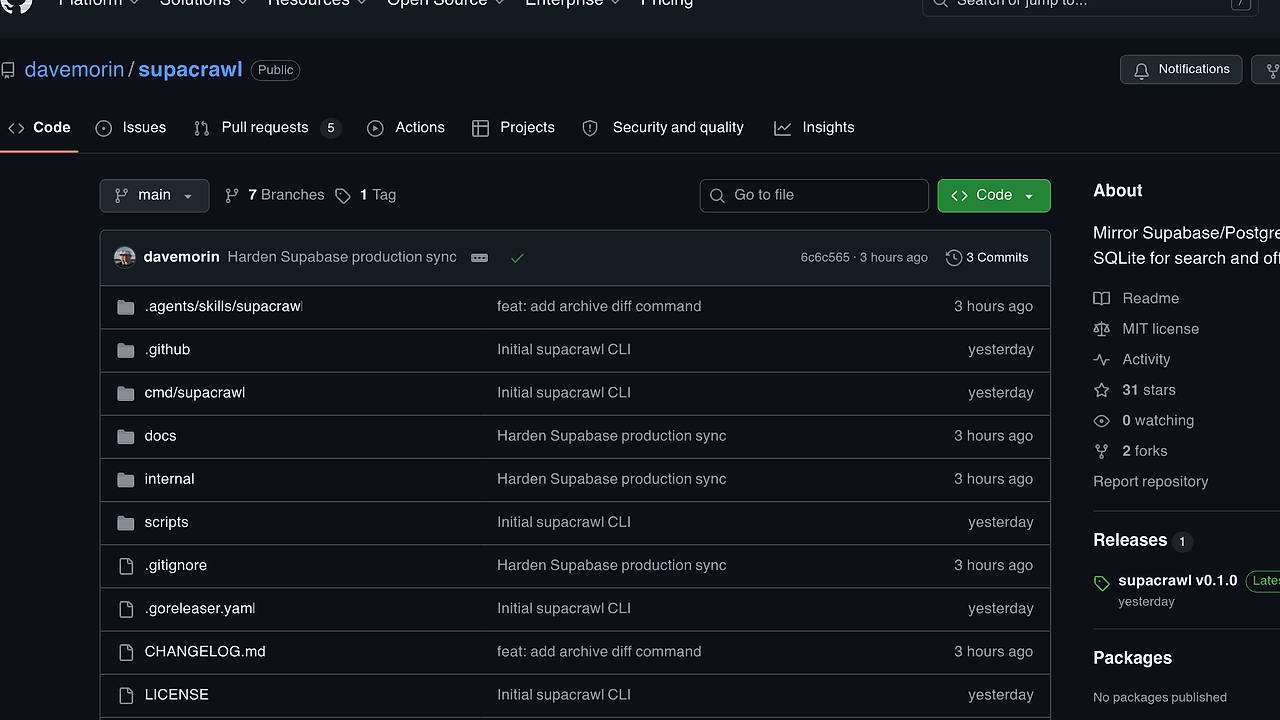
supacrawl is a Go-based Supabase CLI built by Dave Morin in the OpenClaw crawler family. It mirrors Supabase/Postgres metadata into local SQLite for teams, maintainers, and agents, and the current CLI exposes 15+ commands for sync, search, diff, export, storage pulls, backups, and read-only SQL. supacrawl is one of the best Supabase CLI tools for Supabase teams, maintainers, and agents.
The point is simple: crawl once, keep the archive on your machine, and query your backend shape without opening the Supabase dashboard for every lookup. It is aimed at people who want local-first inspection of schemas, RLS policies, functions, triggers, storage inventory, and copied table rows.
Quick Overview
| Attribute | Details |
|---|---|
| Type | Supabase CLI |
| Best For | Supabase teams, maintainers, and agents |
| Language/Stack | Go 1.26+, SQLite FTS5, Postgres |
| License | N/A |
| GitHub Stars | N/A as of Feb 2026 |
| Pricing | Open-Source |
| Last Release | N/A |
Who Should Use supacrawl?
- Platform engineers who need a repeatable local snapshot of Supabase metadata, not another browser tab full of schema pages.
- Backend developers who want to inspect RLS policies, constraints, indexes, and functions with
sqlinstead of clicking through the dashboard. - Indie hackers who run a Supabase-backed product and need fast schema discovery, exports, and quick diffing before deploys.
- Agents and automation jobs that need machine-readable
--jsonoutput for inventory, drift checks, or local knowledge bases.
Not ideal for:
- Teams expecting a full Supabase backup product with edge function source, auth settings, branches, and dashboard configuration mirrored today.
- Users who need a GUI-first database browser rather than a terminal workflow and local SQLite archive.
- Projects without direct Postgres connectivity or without the privileges needed to read catalog metadata.
Key Features of supacrawl
- Local SQLite archive with FTS5 — supacrawl stores the crawl in a local
.dbfile and indexes searchable text with FTS5. That means schema names, functions, policies, storage buckets, and copied rows are queryable offline with low latency. - Supabase/Postgres metadata crawl — it connects over a normal Postgres connection URL and reads schemas, tables, columns, indexes, constraints, RLS policies, functions, triggers, and extensions. This is a real catalog crawl, not a thin wrapper around a REST endpoint.
- Full-table row mirror in JSON —
sync --fullcopies accessible base-table rows intotable_rowsas schema-agnostic JSON. That design survives heterogeneous Supabase schemas and lets you query nested fields withjson_extract(). - Freshness-aware reads — read commands refresh metadata automatically when the local snapshot is stale, with a default
15mwindow. You can force deterministic behavior with flags like--sync neveror--sync alwayswhen you need reproducible reads in CI or agent runs. - JSON and tabular automation output — commands like
metadata --json,status --json,doctor --json, andsqlare built for scripts, launchers, and other tooling. This makes supacrawl easy to wire into pipelines, agents, and repo automation. - Storage object mirroring and blob pulls — when
storage.objectsis visible, supacrawl inventories buckets and can download blobs into a local directory. That closes the loop between metadata inspection and artifact retrieval for teams using Supabase Storage. - Encrypted backup shards with age —
backup pushcreates encrypted JSONL gzip shards plus a manifest, andbackup pullcan restore them later. The model is local-only today, which is useful for secure archive rotation without publishing snapshots.
supacrawl vs Alternatives
| Tool | Best For | Key Differentiator | Pricing |
|---|---|---|---|
| supacrawl | Local Supabase metadata inspection and row snapshots | SQLite archive with FTS5, read-only SQL, and JSON row mirrors | Open-Source |
| Supabase CLI | Migrations, local dev, and project operations | Official tooling for deploying and managing Supabase projects | Free |
| psql | Direct Postgres querying | Lowest-level SQL access against the live database | Free |
| DBeaver | GUI database browsing across engines | Visual table exploration and cross-database support | Freemium |
Pick Supabase CLI when your main task is migrations, local dev orchestration, or official project management workflows. Pick psql when you want the shortest path from shell to live SQL against Postgres, and pick DBeaver when a GUI is more productive for ad hoc browsing.
Pick supacrawl when you want a durable local snapshot, searchable policy and schema inventory, and a read-only archive that agents can query without touching production. If your workflow is broader than Supabase and terminal-first, browse all CLI Tools; if you are wiring the crawl into scripts, backups, or CI jobs, browse all DevOps Automation tools.
How supacrawl Works
supacrawl uses a two-layer data model: a live Postgres source for crawling and a local SQLite archive for querying. The crawl pulls catalog metadata, then writes it into tables such as tables, functions, storage_buckets, and table_rows, with FTS enabled for text-heavy lookup paths. The architecture is deliberately simple because it optimizes for one thing: fast local reads from a snapshot that behaves like an index over Supabase project shape.
The design choices are practical. sync keeps metadata current, sync --full copies data rows as JSON, and sql runs read-only queries against the archive so agents and humans can inspect state without risk. The tool also includes doctor diagnostics, size reporting, diffing against another archive file, and encrypted backup workflows, which makes the archive usable as a first-class artifact rather than a one-off cache.
export SUPABASE_DB_URL="postgres://postgres.<ref>:<password>@aws-0-us-west-1.pooler.supabase.com:6543/postgres?sslmode=require"

supacrawl init --project-id <ref>
supacrawl sync --full --no-row-fts
supacrawl search "rls policies"
supacrawl sql "select schema_name, name, rls_enabled from tables order by schema_name, name limit 20"
That flow creates the local config, crawls metadata plus rows, and then runs searches and SQL only against SQLite. Expect the first full sync to take longer than metadata-only mode because it mirrors table rows and may also inspect Storage objects if those schemas are visible.
Pros and Cons of supacrawl
Pros:
- Local-first inspection — once synced, the archive can be searched and queried without revisiting the live dashboard.
- Fast text search — FTS5 makes policy text, schema names, functions, and copied row content immediately searchable.
- Read-only by default —
sqlruns against the SQLite snapshot, which reduces the risk of accidental production writes. - JSON-friendly automation — structured output works cleanly in agents, CI checks, and repo scripts.
- Schema-agnostic row storage — JSON row mirrors avoid brittle per-table modeling for heterogeneous Supabase projects.
- Operational extras — diff, size, storage pulls, and age-encrypted backups make the archive useful beyond a one-time crawl.
Cons:
- Not a complete Supabase backup — edge function source, auth settings, branches, and dashboard state are not included yet.
- Requires Postgres connectivity and privileges — no connection string or insufficient catalog access means no crawl.
- CLI-first workflow — teams that want visual inspection will still prefer a GUI client.
- Full sync can be heavy — copying rows and indexing them increases archive size and initial runtime.
- Storage downloads need extra secrets — private object pulls require
SUPABASE_URLplus a secret key, not just the DB URL.
Getting Started with supacrawl
brew install davemorin/tap/supacrawl

export SUPABASE_DB_URL="postgres://postgres.<ref>:<password>@aws-0-us-west-1.pooler.supabase.com:6543/postgres?sslmode=require"
supacrawl init --project-id <ref>
supacrawl doctor
supacrawl sync
supacrawl search "auth.uid"
The install path shown on the repo page supports a Homebrew tap, and init writes ~/.supacrawl/config.toml. After the first sync, the archive lands at ~/.supacrawl/supacrawl.db, and subsequent search or sql commands hit the local SQLite file unless freshness rules decide to refresh metadata.
If you also need Storage blob downloads, set SUPABASE_URL and SUPABASE_SECRET_KEY before running storage pull. For row-heavy projects, start with metadata-only sync first, then move to --full once you know which tables are worth mirroring.
Verdict
supacrawl is the strongest option for local Supabase project inspection when you need searchable metadata and read-only SQL without depending on the dashboard. Its main strength is the SQLite snapshot with FTS5 and JSON row support; the caveat is that it is not yet a complete Supabase backup. Use it if you want fast, terminal-native project introspection.