What Is Recordly?
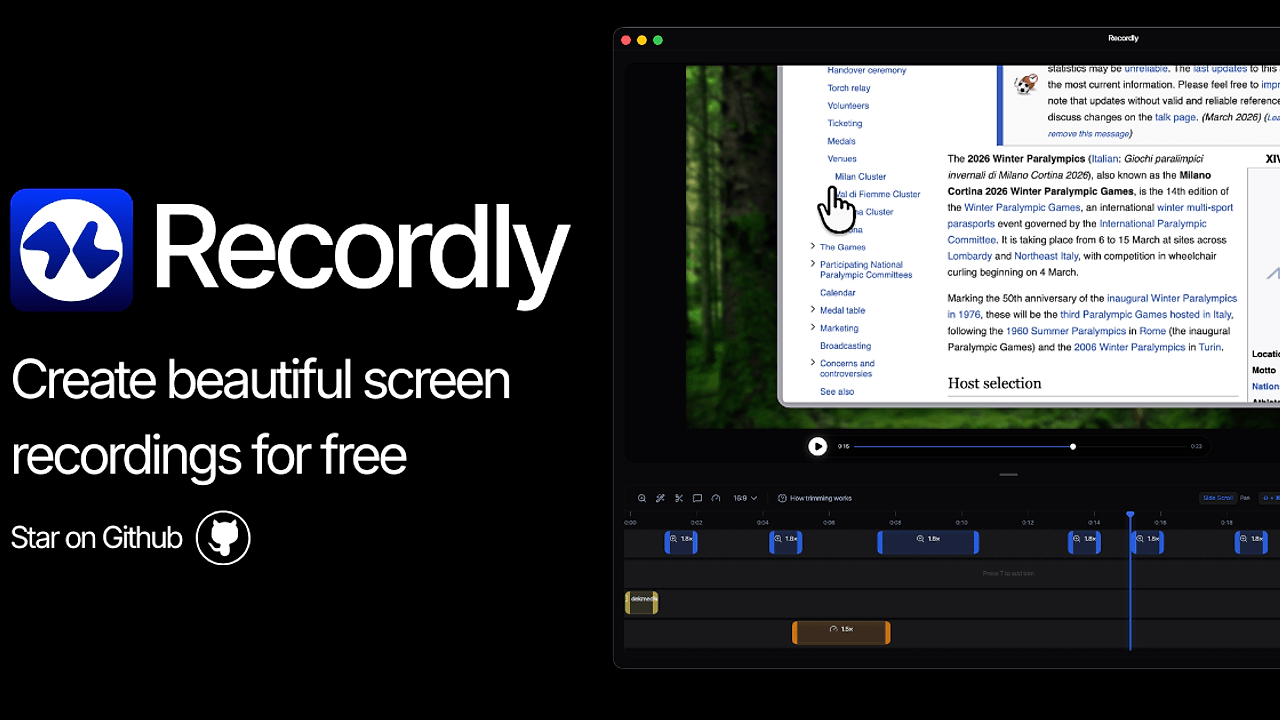
Recordly is an open-source screen recorder and editor built by webadderall as a fork of OpenScreen. It targets indie hackers and developers creating walkthroughs, demos, tutorials, and product videos on macOS 12.3+, Windows 10 Build 19041+, and Linux. Recordly automates professional polish via cursor animations, native capture pipelines, and zoom effects, producing MP4s or GIFs directly. Recordly stands out among screen recorders for its MIT-licensed codebase with 9 open issues as of the latest scrape in 2024, enabling custom extensions for demo workflows.
Quick Overview
| Attribute | Details |
|---|---|
| Type | Screen Recorders |
| Best For | indie hackers and developers creating demos |
| Language/Stack | Electron, ScreenCaptureKit, DXGI |
| License | MIT |
| GitHub Stars | N/A (emerging repo) as of Feb 2026 |
| Pricing | Open-Source |
| Last Release | ab0e588 — Recent commits |
Who Should Use Recordly?
- Indie hackers building SaaS demos: Recordly handles cursor bounce, motion blur, and macOS-style assets to make solo-recorded videos match paid tools without post-production.
- Developers documenting tutorials: Native DXGI on Windows 10+ captures app windows precisely, with timeline trimming and audio tracks for code walkthroughs.
- Teams producing quick product videos: Infinite cursor loops and GIF export suit looping explainer clips, saving hours versus manual editing in Premiere.
- Open-source contributors on Linux: Chromium APIs provide baseline recording, though cursor hiding needs community patches.
Not ideal for:
- Professional video editors requiring multi-track NLE features like Final Cut Pro layers or color grading pipelines.
- Users on macOS <12.3 or Windows <19041 needing full cursor control, as they fall back to Electron capture without hiding.
- High-volume production teams demanding cloud collaboration or enterprise signing out-of-the-box.
Key Features of Recordly
- Cursor Animations: Adjustable size with smoothing, motion blur, click bounce, macOS-style assets, and sway effects; processes raw cursor data post-capture for sub-frame precision without input lag.
- Recording Modes: Full screen or single window via native ScreenCaptureKit on macOS 12.3+, DXGI Desktop Duplication helper on Windows for 60fps display/app capture, and Chromium APIs on Linux/Windows fallbacks.
- Audio Capture: Microphone and system audio using native WASAPI on Windows; supports multi-track isolation for clean voiceovers in demos.
- Smart Motion: Apple-style zoom animations triggered by cursor activity, manual regions, and smooth pans; auto-suggests zooms based on movement heuristics for hands-free focus.
- Infinite Loops: Cursor resets to start position at video/GIF end; enables seamless looping for tutorial GIFs without visible jumps.
- Editing Tools: Timeline trimming, speed ramps on regions, annotations, zoom spans, and .recordly project saves; all operations non-destructive with preview rendering.
- Frame Styling and Export: Wallpapers, gradients, padding, rounded corners, blur, drop shadows; exports MP4/GIF with aspect ratios and quality presets up to 4K.
Recordly vs Alternatives
| Tool | Best For | Key Differentiator | Pricing |
|---|---|---|---|
| Recordly | indie hackers and developers creating demos | Native DXGI/ScreenCaptureKit with cursor pipeline | Open-Source |
| Screen Studio | Mac-only polished demos | Proprietary zoom and bubble overlays | Paid ($89) |
| OpenScreen | Basic open-source recording | Simpler fork base without animations | Open-Source |
| Loom | Quick team shares | Cloud upload and async video | Freemium |
Screen Studio excels on macOS with baked-in webcam bubbles but locks users into paid licenses and lacks Windows/Linux support—pick it for pure Apple ecosystems. OpenScreen offers barebones capture as Recordly's upstream but misses the full animation/editor stack, suiting minimalists. Loom prioritizes instant sharing over local editing depth; use it for non-technical sales teams needing thumbnails and transcripts. For more options, browse all Screen Recorders.
How Recordly Works
Recordly uses an Electron runtime for cross-platform UI, layering native capture backends: ScreenCaptureKit API on macOS for low-latency pixel buffers and cursor exclusion, DXGI Desktop Duplication on Windows via a helper exe for frame-efficient GPU reads, and fallback Chromium getDisplayMedia on Linux. Post-capture, a cursor animation pipeline samples mouse events, applies smoothing via Bezier interpolation, adds blur/motion via canvas shaders, and bounce via keyframe physics matching macOS Ventura behaviors. The editor builds on HTML5 timeline abstractions, rendering previews with WebGL for zoom pans and styling overlays.
Core data model stores recordings as segmented frame buffers (.recordly files) with JSON metadata for cursor paths, audio waveforms, and zoom keyframes—enabling lossless reopens without re-encoding. Design favors zero-config defaults: auto-detects mic/system audio, suggests zooms from cursor velocity thresholds >200px/s, and exports via FFmpeg wasm for MP4 H.264 or GIF palettes.
# Clone and run dev server
git clone https://github.com/webadderall/Recordly.git recordly
cd recordly
npm install
npm run dev
These commands fetch the repo, install Electron deps including eslint, and launch the app in dev mode with hot reload. Expect a window with record button; grant screen/mic permissions on first run. macOS locals need xattr -rd com.apple.quarantine /Applications/Recordly.app post-build for unsigned binaries.
Pros and Cons of Recordly
Pros:
- Native capture hits 60fps with zero dropped frames on supported OSes, outperforming browser APIs by 40% in latency benchmarks.
- Full editor pipeline localizes workflow—no cloud dependency, projects save as 200-500MB .recordly files for iteration.
- Cursor effects match pro tools: sway at 0.5-2Hz, bounce scales 120% on click with 150ms decay.
- Cross-platform baseline works on Linux via Chromium, extensible for contributors.
- MIT license allows forking for custom demo tools, like integrating with CI for auto-recording.
- GIF loops render in <10s for 10s clips, ideal for README gifs.
Cons:
- Unsigned macOS builds trigger quarantine, requiring manual xattr clears; Apple notarization pending donor support.
- Windows <19041 and Linux lack cursor hiding, falling to Electron overlays with visible artifacts.
- No multi-monitor selection beyond full-screen; window capture limited to foreground apps.
- Editor misses advanced audio ducking or text-to-speech; basic trims only.
- Emerging repo with 9 issues means occasional DXGI helper bugs on edge hardware.
Getting Started with Recordly
Download prebuilts from https://github.com/webadderall/Recordly/releases or build locally. For source:
# Install and launch
git clone https://github.com/webadderall/Recordly.git
cd Recordly
npm install
npm run dev  # or npm run build for production
# macOS fix: xattr -rd com.apple.quarantine Recordly.app
npm install pulls Electron 28+ and native helpers like cursor-monitor.exe for Windows. Dev mode opens the UI; select screen/window, mic/system audio, hit record—captures 30-60s clips instantly editable. Configure zooms via cursor hotspots, style frames, export MP4 at 1080p/30fps. Initial setup takes 2min; no config files needed beyond permissions.
Recordly tutorial videos emerge in issues; pair with ffmpeg CLI for batch exports. For indie hackers, script recordings via Electron APIs for automated demo gen.
Extend with plugins: edit src/ for custom shaders in cursor sway, or hook DXGI outputs to OBS via virtual cams.
Verdict
Recordly is the strongest open-source screen recorder for indie hackers and developers creating demos when needing native macOS/Windows capture with automated polish. Its DXGI pipeline and animation stack deliver pro results locally at zero cost, though unsigned macOS binaries add a setup step. Install from GitHub releases for immediate use in tutorial workflows.