What Is boneyard?
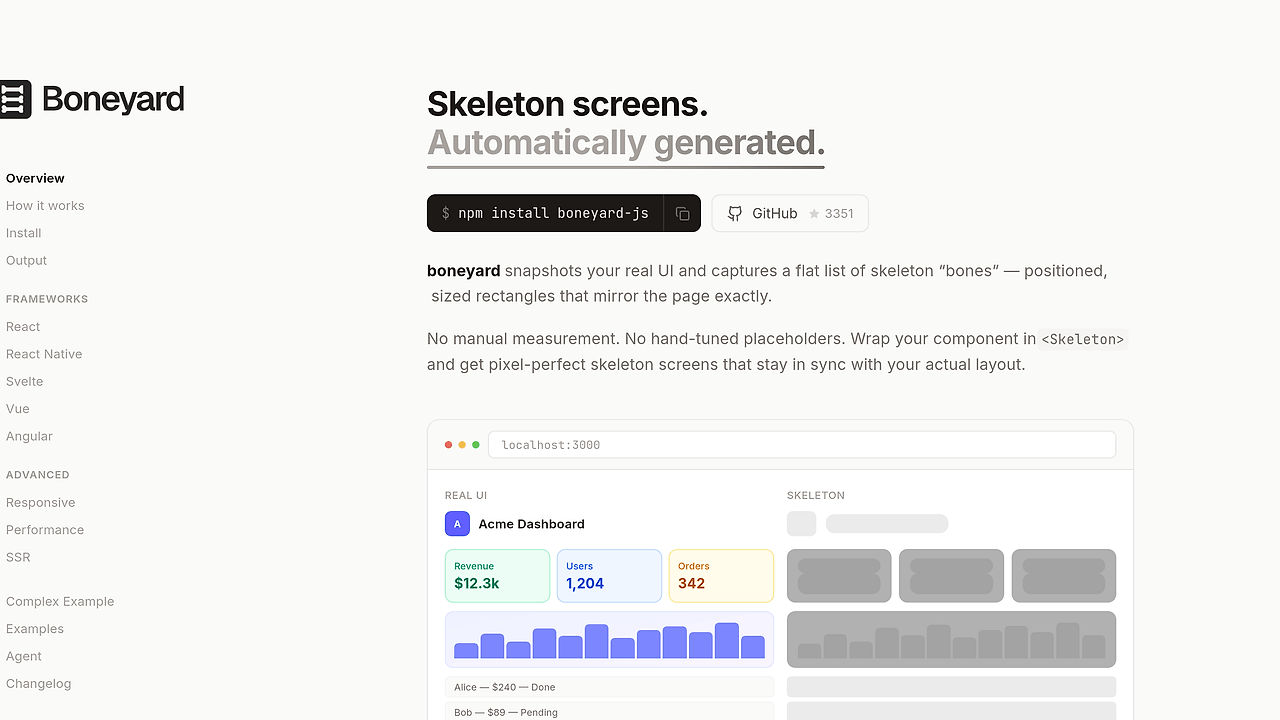
boneyard is an open-source skeleton loading framework built by 0xGF that extracts pixel-perfect placeholders from real UI and is one of the best Skeleton Loading Frameworks tools for frontend engineers, product teams, and indie hackers shipping React, Svelte 5, or React Native apps. The GitHub repository shows 3.4k stars and 117 forks as of Feb 2026, which is a solid signal that the project has real usage beyond demo code.
The design goal is simple: replace hand-tuned gray boxes with generated loading states that mirror the actual layout tree. That means fewer one-off CSS hacks, less time spent matching spacing, and fewer loading screens that drift out of sync with the production component.
Quick Overview
| Attribute | Details |
|---|---|
| Type | Skeleton Loading Frameworks |
| Best For | Frontend engineers, product teams, and indie hackers shipping React, Svelte 5, or React Native apps |
| Language/Stack | TypeScript, React, Svelte 5, React Native |
| License | MIT |
| GitHub Stars | 3.4k as of Feb 2026 |
| Pricing | Open-Source |
| Last Release | N/A |
Who Should Use boneyard?
- React teams shipping content-heavy apps that need loading states for cards, feeds, dashboards, and detail pages without building every placeholder by hand.
- Svelte 5 developers who want a generated skeleton layer that tracks component shape instead of maintaining a separate set of guessed dimensions.
- React Native product teams that need a consistent loading experience across mobile screens without rewriting the same shimmer logic per view.
- Indie hackers and small teams that care about fast implementation speed and want a generated registry instead of a custom design-system skeleton package.
Not ideal for:
- Teams that only need one or two static placeholders and do not want the extra build step or generated registry.
- Projects with very stable layouts where a plain component library like
react-loading-skeletonis easier to maintain. - Design systems that already standardize every loading surface and do not want automatic extraction to influence implementation details.
Key Features of boneyard
- Generated skeleton registry — boneyard builds a
bones/registryfile that maps named UI surfaces to skeleton definitions. That gives teams a stable contract such asname="blog-card"instead of scattering layout guesses across the app. - Pixel-matched placeholders — the project is built around extracting skeletons from the real interface, not from a designer's memory. That reduces drift between the loading state and the final component, which is where most placeholder UIs go wrong.
- Framework adapters — boneyard supports React, Svelte 5, and React Native from the same conceptual model. The runtime API stays familiar, while the emitted implementation can change per platform.
- Build-time generation — the
npx boneyard-js buildstep creates the skeleton artifacts before runtime. That means the browser or app shell does less work when loading, and the expensive analysis happens once in the pipeline. - Named component wrappers — the
<Skeleton />wrapper lets you gate rendering with a simpleloadingflag. The approach keeps loading behavior close to the view logic instead of forcing a separate route or template. - Zero manual measurement — boneyard removes the need to hand-count spacing, widths, and heights for every page fragment. That matters on content-rich screens where a single feed card can contain image, title, metadata, and action rows.
- Small-team friendly workflow — the repo is structured like a modern JavaScript workspace with
pnpmfiles, app packages, and generated assets. That makes it easy to inspect, diff, and review the output in a normal Git flow.
boneyard vs Alternatives
| Tool | Best For | Key Differentiator | Pricing |
|---|---|---|---|
| boneyard | Auto-generated loading skeletons from real UI | Build-time extraction and named skeleton registry | Open-Source |
| react-loading-skeleton | Simple hand-authored skeletons in React | Minimal setup, no generation step | Open-Source |
| MUI Skeleton | Teams already on Material UI | Fits the MUI design system and component API | Open-Source |
| shadcn/ui skeleton patterns | App teams using shadcn/ui and Tailwind | Copy-paste primitives with full local control | Open-Source |
Pick react-loading-skeleton if you want a tiny React-only package and are fine authoring placeholders by hand. Pick MUI Skeleton if your app already lives inside Material UI and you want a uniform design-system component with no extra tooling.
Pick shadcn/ui skeleton patterns if you want fully local, editable UI primitives and do not care about generation. Pick boneyard if you want the skeleton layer to follow the real UI instead of relying on manual approximation. If your team is already using Claude Code Canvas or Claude Context Mode, the generated registry is also easy to inspect during refactors and code review. For larger monorepos that need coordinated file edits across many screens, OpenSwarm fits the same workflow family.
How boneyard Works
boneyard treats loading UI as a generated artifact, not as a separately designed component tree. The core abstraction is a named skeleton contract: a real surface like blog-card is mapped to a generated placeholder recipe, and the app decides when to render that placeholder through a normal loading flag.
The technical decision that matters most is the split between build-time analysis and runtime display. The build step emits the bones/registry file, while the runtime wrapper only needs to resolve the requested skeleton name and render the matching layout shape.
npm install boneyard-js
npx boneyard-js build

# Add once in your app entry
import './bones/registry'

# React example
import { Skeleton } from 'boneyard-js/react'

function BlogPage() {
  const { data, isLoading } = useFetch('/api/post')

  return (
    <Skeleton name="blog-card" loading={isLoading}>
      {data && <BlogCard data={data} />}
    </Skeleton>
  )
}
This flow installs the package, generates the registry, and wires the app to a named skeleton surface. In practice, that means you get a repeatable loading state for each screen, and the only manual work left is choosing where the loading flag should come from.
Pros and Cons of boneyard
Pros:
- Matches real UI structure instead of forcing developers to guess widths, heights, and spacing.
- Works across multiple frameworks with React, Svelte 5, and React Native support in the same project family.
- Build-time generation reduces runtime overhead because the skeleton artifacts are created before the app runs.
- Named skeletons make reviews easier because diffs are visible in a registry file rather than buried in ad hoc CSS.
- Good fit for content-driven screens like feeds, CMS pages, dashboards, and card grids where placeholder drift is obvious.
- MIT-licensed and repo-visible so teams can audit the implementation and extend it without vendor lock-in.
Cons:
- Requires a build step that simpler skeleton libraries do not need.
- Best value appears on complex layouts; tiny apps may not recover the setup cost.
- Documentation depth is limited by the repo text shown on the page, so some teams may need to inspect source before adopting.
- Generated output adds another artifact to maintain and review in CI.
- Not a drop-in replacement for design-system skeletons if the whole team already standardizes on MUI or shadcn/ui patterns.
Getting Started with boneyard
npm install boneyard-js
npx boneyard-js build
After the build finishes, import ./bones/registry once in your app entry and wrap a loading branch with the framework adapter you are using. The first pass usually needs a quick check that the generated skeleton names match the real component names, and then the setup becomes a repeatable part of the build.
For React, the pattern is the same as the snippet above. For Svelte 5 and React Native, the package swaps the adapter layer but keeps the same high-level workflow: generate once, import the registry, and render by name.
Verdict
boneyard is the strongest option for teams that want automated skeleton generation when their UI changes often and placeholder drift is a recurring bug. Its main strength is the generated registry tied to real layouts, while the caveat is the extra build step and artifact management. If your app has many content-heavy screens, boneyard is worth adopting.